 A colleague of mine, Mark, he came around two weeks ago and suggested to have a look at this running application for your phone. He installed and tried it himself and liked it. Having used the Nokia Sports Tracker for quite a while, there was a benchmark to beat. These sports apps are becoming more and more and with Smartphones having more and more connectivity and sensors, there probably will be coming some more apps and services in the future. What’s interesting is that mobile phones have been designed for mobile use from the start, but when it comes to sports that include being on the move, many solutions still fall short of the requirements. It’s mainly I/O (input/output) paradigms that are the bottle neck. Try to read text on a phone screen while riding a bike, try to do something on a touch screen interface while running. It just requires too much effort. Hence sport apps need to optimize mobile use to the max. Endomondo goes a good step in that direction. (reserve some time, a bit of a longer post)But let’s take things in order of appearence. Downloading and installing the app - I’m using a Nokia E72 - was a breeze and an enjoyable experience. Chose to go with the PC’s web browser (Firefox) to the Endomondo page and provided phone number and phone model on the download page. Repeated the same on a another handset a Nokia X6, this time however used the mobile browser (WebKit) to go to Endomondo’s download page. I could select the device, the page correctly displayed the device next to the “send”-the download link button, but when pressing so the web page always replied by “select your phone’s brand and model”. There’s a detail to fix. Apart from that glitch, the installation went well on the X6, too.
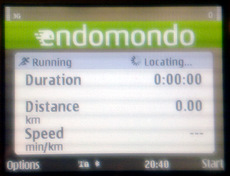 When opening up the app it greets you with a positively simple screen. The app immediately goes and looks for a GPS fix. It finds it always and quickly, even indoors sometimes, which is interesting, since I’d think it’s up to the GPS module in the device to either find it or not, all apps that use it should react the same way. But that’s not so relevant here. It’s important the the GPS fix comes surely and quickly, since you don’t want to wait before the run just to be sure of that. The app should handle that automatically in a way that the user is happy.
Then it’s to set up the app for your use. In the options you can select from 21 different types of sports. Hm, I’m not sure what this selection actually does to the app or the endomondo service on the web. Perhaps it changes measurements, runners want a min/km or min/miles measurement for the pace, bikers I guess would prefer km/h (miles/h). In the settings you enter your Endomondo account (which you set up on their web page), then the app connects to it. Then comes the best part, the audio feedack. It’s on by default and that’s definitely worth keeping that way.
The idea is simple, the app talks to you instead of something happening on the display that you probably won’t be able to see anyway. That’s really neat and works (with a headset) quite well. There are apparently two channels through with audio feedback reaches you. One is the audio coach, that voice tells you the time for the recent kilometer upon completition and how long the total run will take assuming you run at the same pace from that point to the end. I’ve had it on everytime and it really got me going. The long runs (25 - 30km) that are supposed to be long and slower were in 4:15 to 4:12min/km. Not too slow as I figured. The female voice was in most cases easy to understand, sometimes it left out some syllables or a number in the times, then I didn’t get it. Such as “The last km was run in -:15 minutes …”. Also the voice could talk a tad slower, many non-native English speakers could grasp it better. But that’s really just details. I really liked the coach idea and could see there’s a lot of potential in extending this idea. E.g. what about Homer Simpson commenting your runs?
The other channel is Pep talk. For that I guess you need someone spotting you on the Endomondo web service while you’re out running. Those friends can write a short text in English, which is turned into speech and sent to your app that brings it on the headset. This way your buddies can come up with poetic extravaganza such as “quäl Dich, Du Sau!” (”torture yourself, you bitch!”, free translation of what Udo Böltz screamed at the later Tour de France winner Jan Ulrich while on the ascent of Alpe d’Huez). Unfortunately, I haven’t had the chance to try this out, since I have not yet collected any buddies in the Endomondo service, so in case you want some sparring out there, ping me, you find micke midlife in the friends search. Anyway, this feature seems really neat and a quite immersive way to get a bit of social interaction into a sports tool that in most cases up to now was a tool pretty much for the individual him/herself, i.e. tracking what the individual was doing, showing the results in the end, putting it visually nicely on a map. The Endomondo app does this as well in a minimalistic way, just km times listed and the route on a map.
The phone app itself doesn’t do much more. It’s rather focused whereas other apps, e.g. the Nokia Sports Tracker is broader in nature with more ways of displaying results on the device, tracking your music and pictures and the heart rate monitor piece, which the Endomondo app doesn’t support. Further, I think the current app is a Java app, which means, if you hit the red “end call” button to get back to the home screen of your device, the app closes and doesn’t stay open in the background as native Symbian apps would do. So that’s just good to know and it’s best to lock the keys when out there running. Also, the integration with other parallel active apps needs some fine tuning. When listening to music for example, the Endomondo voice appears and interrupts the music correctly, that’s fine. But when the music comes back on it’s on max volume for half a second and that can be surprising when you’re in trance running between kilometer 22 and 23 and suddenly Offsring blasts “why don’t you get a job” in your ears.
The web service is well set-up. It has a nice layout and looking at your runs there makes much more sense than on the device app. I really like the app and the service and will definitely use it further on, especially now with the Nokia Sports Tracker not really developing further right now. Have a try and let us know what you think of it.
Tags: endomondo, running app, sports tracker








Leave a Reply
You must be logged in to post a comment.